Android UI Library


License

License

GroupId

GroupId

com.github.markushi
ArtifactId

ArtifactId

android-ui
Last Version

Last Version

1.2
Release Date

Release Date

Type

Type

aar
Description

Description

Android UI Library
Android UI Library
Project URL

Project URL

https://github.com/markushi/android-ui
Source Code Management

Source Code Management

https://github.com/markushi/android-ui

Download android-ui

How to add to project

<!-- https://jarcasting.com/artifacts/com.github.markushi/android-ui/ -->
<dependency>
    <groupId>com.github.markushi</groupId>
    <artifactId>android-ui</artifactId>
    <version>1.2</version>
    <type>aar</type>
</dependency>
// https://jarcasting.com/artifacts/com.github.markushi/android-ui/
implementation 'com.github.markushi:android-ui:1.2'
// https://jarcasting.com/artifacts/com.github.markushi/android-ui/
implementation ("com.github.markushi:android-ui:1.2")
'com.github.markushi:android-ui:aar:1.2'
<dependency org="com.github.markushi" name="android-ui" rev="1.2">
  <artifact name="android-ui" type="aar" />
</dependency>
@Grapes(
@Grab(group='com.github.markushi', module='android-ui', version='1.2')
)
libraryDependencies += "com.github.markushi" % "android-ui" % "1.2"
[com.github.markushi/android-ui "1.2"]

Dependencies

There are no dependencies for this project. It is a standalone project that does not depend on any other jars.

Project Modules

There are no modules declared in this project.

Deprecated

This library is deprecated and no further development is taking place.

android-ui

Android library for UI components.
Gradle integration:

repositories {
    mavenCentral()
}

dependencies {
    compile 'com.github.markushi:android-ui:1.2'
}

Requires API level 14+
Download example apk

Components

ActionView

ActionView Example
A widget which can dynamically animate between defined Actions.

<at.markushi.ui.ActionView
	android:id="@+id/action"
	android:layout_width="56dip"
	android:layout_height="56dip"
	android:padding="16dip"
	app:av_color="@android:color/white"
	app:av_action="drawer"/>

You can dynamically change the action with:

actionView.setAction(new BackAction(), ActionView.ROTATE_COUNTER_CLOCKWISE);

The following Actions are built in:

  • DrawerAction
  • BackAction
  • CloseAction
  • PlusAction

Please note: ActionView is still under development. The API might change at any time.

RevealColorView
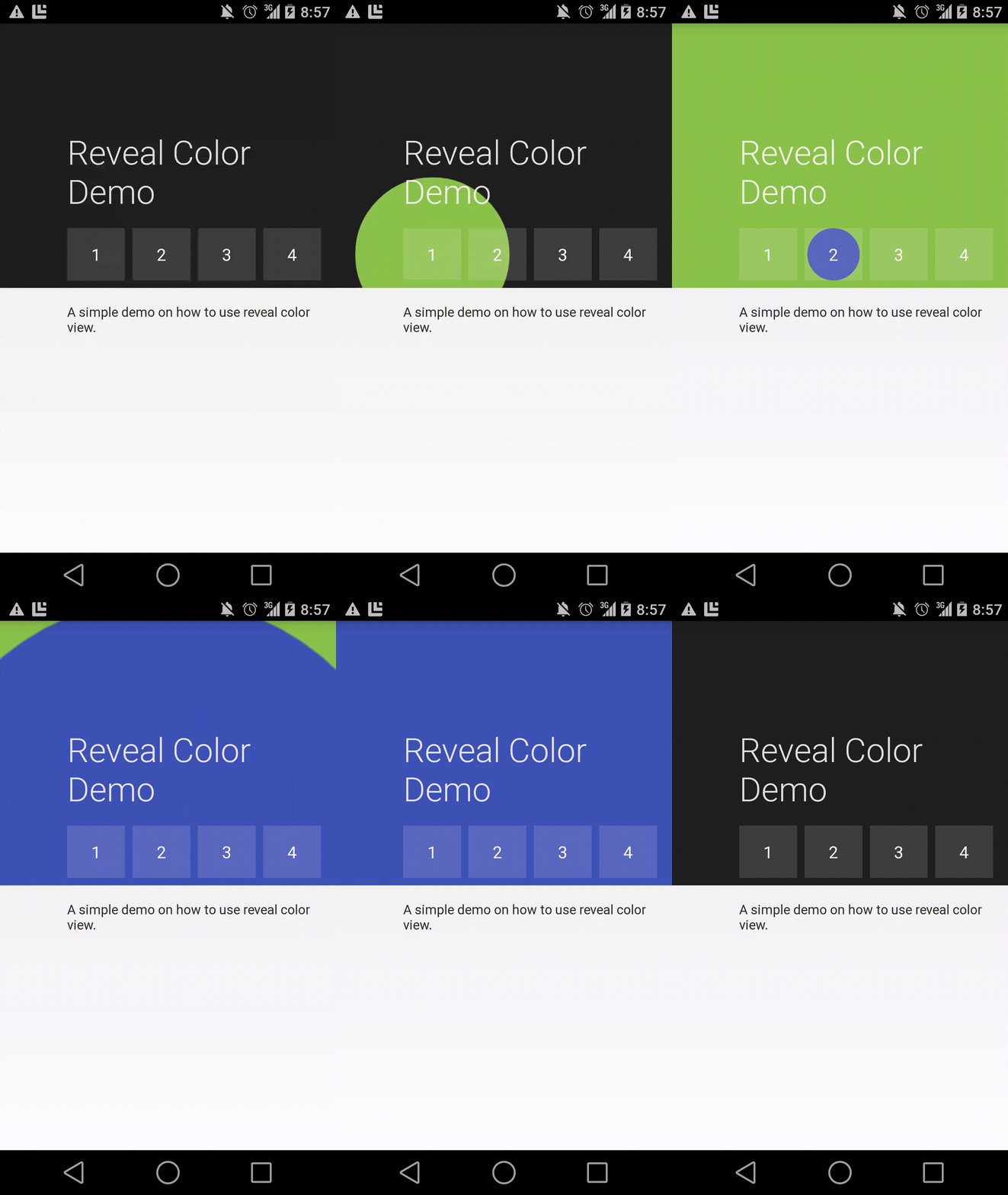
RevealColorView Example
A component which mimics parts of the circular reveal/hide animation introduced in the Android-L preview.
Note: This is not a backport of the original reveal/hide effect.

See this example gist on how to use it.

Versions

Version
1.2
1.1
1.0