 JarCasting
Material Checklist




The flexible, easy to use checklist library written in Kotlin for your Android projects.
Preview
Download the sample application from the Google Play Store!
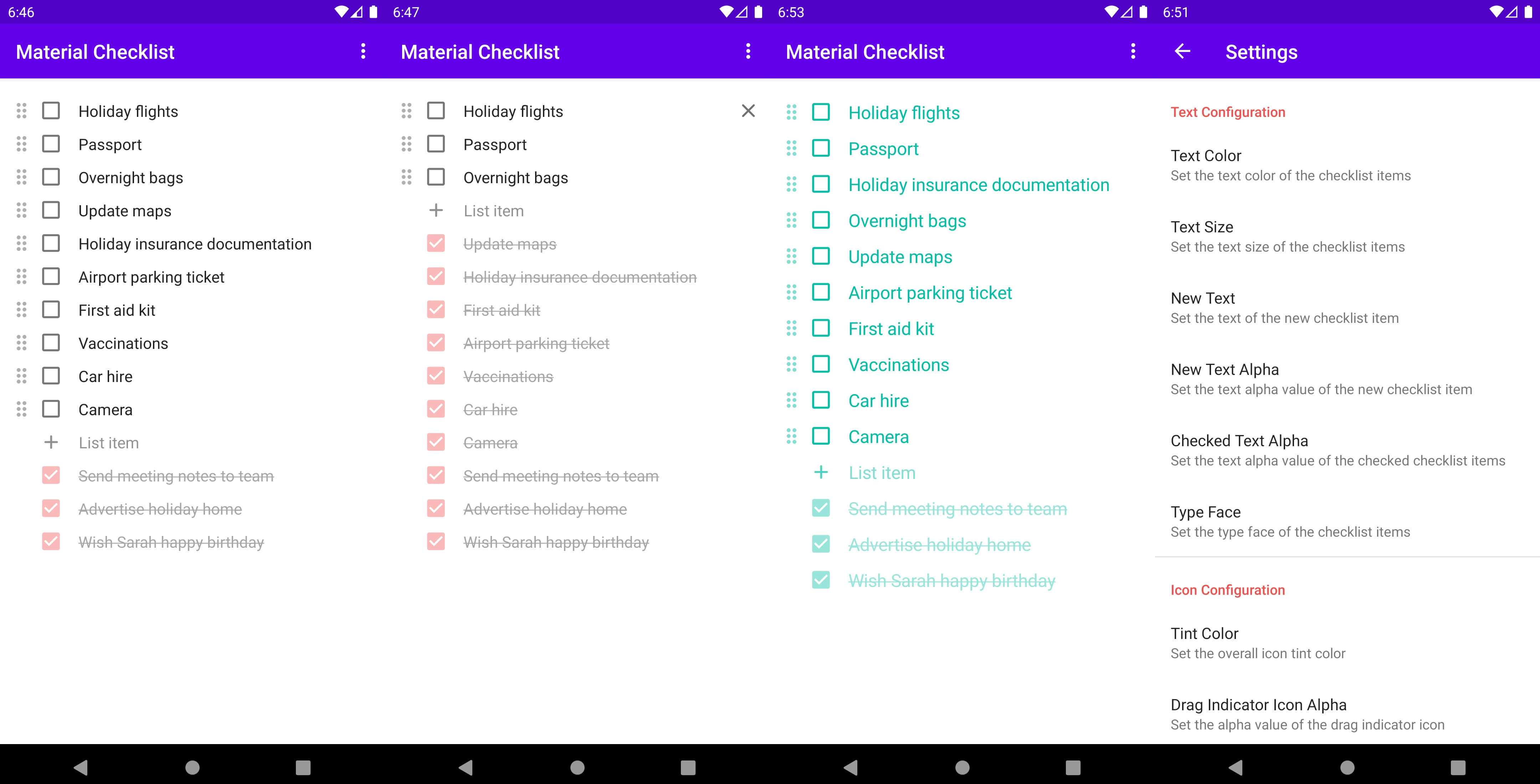
Dependency
Add this to your module's build.gradle file:
dependencies {
  ...
  implementation 'io.github.damianvdb:materialchecklist:1.0.0'

  // Required Android libraries
  implementation 'androidx.appcompat:appcompat:1.1.0'
  implementation 'androidx.recyclerview:recyclerview:1.1.0'
}
Usage
Add the Material Checklist in XML
<LinearLayout xmlns:android="http://schemas.android.com/apk/res/android"
    android:layout_width="match_parent"
    android:layout_height="match_parent">

    <com.dvdb.materialchecklist.MaterialChecklist
        android:id="@+id/checklist"
        android:layout_width="match_parent"
        android:layout_height="match_parent" />

</LinearLayout>
Set the items
// Formatted string representation of the items
val items: String = "[ ] Send meeting notes to team\n" +
                "[x] Advertise holiday home\n" +
                "[x] Wish Sarah happy birthday"

// Set the items as formatted text
checklist.setItems(items)
Get the items
The formatted string representation of the checklist items shouldn't be altered.
// Get the items as formatted text
val items: String = checklist.getItems()
Set an on item deleted listener
// Set listener
checklist.setOnItemDeletedListener { text, id ->

    // Snackbar message with text of the deleted item
    val message = "Checklist item deleted: \"$text\""

    // Show snackbar with 'undo' action
    Snackbar.make(root, message, Snackbar.LENGTH_LONG)
        .setAction("undo") {

            // Restore deleted item
            checklist.restoreDeletedItem(id)

        }.show()
}
Restore the deleted items
// Restore a single deleted item
val itemId: Long = 100
checklist.restoreDeletedItem(itemId)

// Restore multiple deleted items
val itemIds: List<Long> = listOf(200, 201, 230, 240)
checklist.restoreDeletedItems(itemIds)
Remove all the items that are marked as checked
// Ids of the removed items which can be used to restore them
val removedItemIds: List<Long> = checklist.removeAllCheckedItems()
Uncheck all the items that are marked as checked
checklist.uncheckAllCheckedItems()
Set the focus on an item at a specified position
// Set the focus on the first item
checklist.setItemFocusPosition(0)
Configuration
All the XML styling attributes are available under the app namespace:
xmlns:app="http://schemas.android.com/apk/res-auto"
All configuration options programmatically set need to be terminated with applyConfiguration() to take effect.
Text
checklist.setTextColor(textColor: Int?, textColorRes: Int)
    .setLinkTextColor(textColor: Int?, textColorRes: Int)
    .setTextSize(textSize: Float?, textSizeRes: Int?)
    .setNewItemText(text: String?, textRes: Int?)
    .setCheckedItemTextAlpha(alpha: Float)
    .setNewItemTextAlpha(alpha: Float)
    .setTextTypeFace(typeface: Typeface)
    .setLinksClickable(linksClickable: Boolean)
    .applyConfiguration()
<com.dvdb.materialchecklist.MaterialChecklist
    ....
    app:text_color="..."
    app:text_link_text_color="..."
    app:text_size="..."
    app:text_new_item="..."
    app:text_alpha_checked_item="..."
    app:text_alpha_new_item="..."
    app:text_links_clickable="..." />
Icon
 checklist.setIconTintColor(tintColor: Int?, tintColorRes: Int?)
    .setDragIndicatorIconAlpha(alpha: Float)
    .setDeleteIconAlpha(alpha: Float)
    .setAddIconAlpha(alpha: Float)
    .applyConfiguration()
<com.dvdb.materialchecklist.MaterialChecklist
    ...
    app:icon_tint_color="..."
    app:icon_alpha_drag_indicator="..."
    app:icon_alpha_delete="..."
    app:icon_alpha_add="..." />
Checkbox
checklist.setCheckboxTintColor(tintColor: Int?, tintColorRes: Int?)
    .setCheckedItemCheckboxAlpha(alpha: Float)
    .applyConfiguration()
<com.dvdb.materialchecklist.MaterialChecklist
    ...
    app:checkbox_tint_color="..."
    app:checkbox_alpha_checked_item="..." />
Drag-and-drop
checklist.setDragAndDropToggleBehavior(behavior: DragAndDropToggleBehavior)
    .setDragAndDropDismissKeyboardBehavior(behavior: DragAndDropDismissKeyboardBehavior)
    .setDragAndDropItemActiveBackgroundColor(backgroundColor: Int?, backgroundColorRes: Int?)
    .applyConfiguration()
<com.dvdb.materialchecklist.MaterialChecklist
    ...
    app:drag_and_drop_toggle_behavior="..."
    app:drag_and_drop_dismiss_keyboard_behavior="..."
    app:drag_and_drop_item_active_background_color="..." />
Item
checklist.setOnItemCheckedBehavior(behavior: BehaviorCheckedItem)
    .setOnItemUncheckedBehavior(behavior: BehaviorUncheckedItem)
    .setItemFirstTopPadding(padding: Float?, paddingRes: Int?)
    .setItemLeftAndRightPadding(padding: Float?, paddingRes: Int?)
    .setItemTopAndBottomPadding(padding: Float?, paddingRes: Int?)
    .setItemLastBottomPadding(padding: Float?, paddingRes: Int?)
    .applyConfiguration()
<com.dvdb.materialchecklist.MaterialChecklist
    ....
    app:behavior_checked_item="..."
    app:behavior_unchecked_item="..."
    app:item_padding_first_top="..."
    app:item_padding_left_and_right="..."
    app:item_padding_last_bottom="..." />
Apps using MaterialChecklist
Want to be here? Open an issue or make a pull request.
Developed by
- Damian van den Berg
- Google Play Store
License
Copyright 2021 Damian van den Berg

Licensed under the Apache License, Version 2.0 (the "License");
you may not use this file except in compliance with the License.
You may obtain a copy of the License at

   http://www.apache.org/licenses/LICENSE-2.0

Unless required by applicable law or agreed to in writing, software
distributed under the License is distributed on an "AS IS" BASIS,
WITHOUT WARRANTIES OR CONDITIONS OF ANY KIND, either express or implied.
See the License for the specific language governing permissions and
limitations under the License.